Every day
is a dot.
A black and white habit tracker for Android. Your year in dots on the lock screen, your habits and tasks on the home screen.
Free for up to 4 habits · Works offline
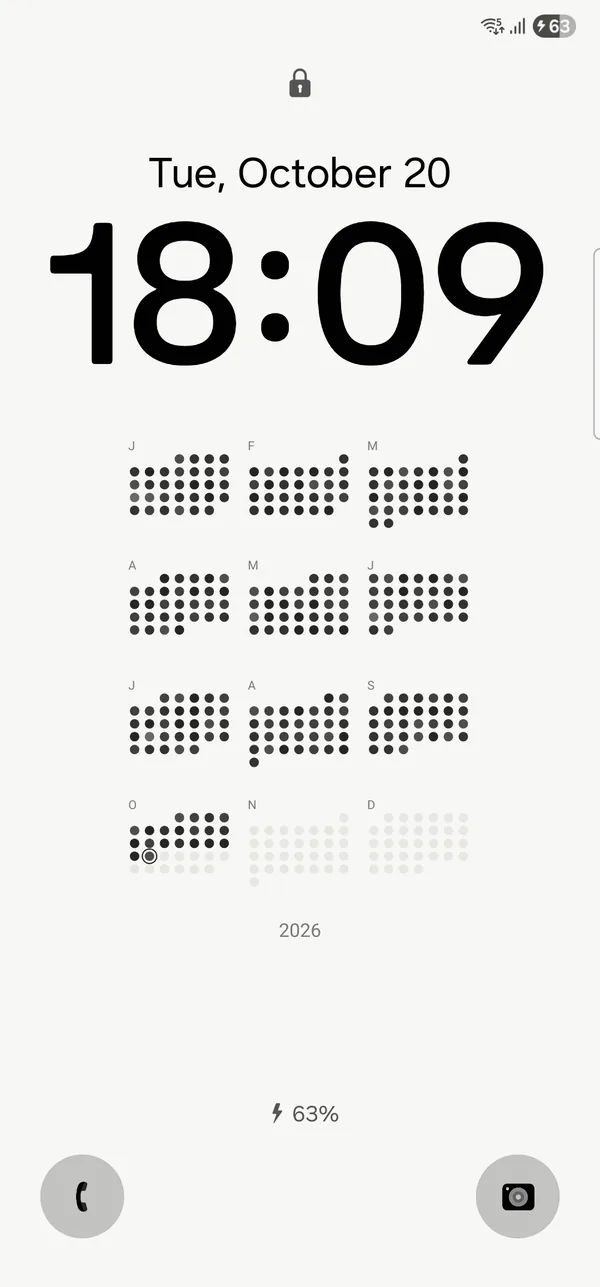
Your year,
on the lock screen.
365 dots that fill in as you check things off. No app to open.



Check off habits from your home screen.
Single habit, checklist and inbox widgets, in every size. No need to open the app.
One tap a day.
Tap the box and the day becomes a dot. Three glasses of water? Three taps.
Never miss twice.
Life happens. One missed day is forgiven; two in a row start you over.
Widgets in every look.
Eight looks, all black and white.
Tasks, too.
Tasks live next to your habits. Add one in a second, check it off, and find it later under Done.
Every dot
has a story.
Every day, certain weekdays, or a number per week. Tap a day to see what happened and add a line about it.
Free to start.
Tracking, every widget and your data stay free. Pro is for more habits, more looks and sync.
| Feature | Free | Pro |
|---|---|---|
| Habits | Up to 4 | Unlimited |
| Widgets, every size | ||
| Reminders, inbox, notes | ||
| Backup and CSV export | ||
| Widget looks | Paper | All 8 |
| Lock screen looks | Classic | All 8 |
| Evening check-in | ||
| Sync across phones |
Prices are in US dollars and differ by country. Google Play shows yours before you pay.
Start free on Google PlayQuestions.
The short answers before you install.
Is HabitDots free?
Yes, for up to 4 habits. That includes every widget size, reminders, notes, the inbox, backup and the Classic lock screen. Pro adds unlimited habits, more looks, the evening check-in and sync.
Is there an iPhone version?
Not yet. HabitDots is on Android for now.
How do I put my year on the lock screen?
Open Settings in the app, then Lock screen. HabitDots sets a picture as your lock screen wallpaper and redraws it as you check things off. Your home screen wallpaper stays as it is.
How do I add a widget?
Long-press your home screen, choose Widgets and find HabitDots. Then you can check off habits and tasks without opening the app.
What happens if I miss a day?
One missed day is forgiven. Two in a row start your streak over. Days that are not on a habit’s schedule never count as a miss.
Where is my data?
On your phone, and it works offline. If you turn on sync, a copy of your habits is stored with Google Firebase. The privacy policy has the details.
How do I cancel Pro?
The yearly plan is cancelled in Google Play, under Payments & subscriptions. Pro stays on until the paid period ends. Lifetime is a single payment with nothing to cancel.
Made by one person.
HabitDots is made by Furqatbek Mashrabjonov, an independent developer in Uzbekistan. I love black and white design and the calm of Notion, so I built the habit tracker I wanted to use myself.
Start with one habit.
One tap, one dot a day.
Questions or ideas? Write to [email protected]